
Supercharge WhatsApp with Automation
Overview
The software is designed to enhance the functionality of WhatsApp Web by introducing automation capabilities tailored for users seeking greater efficiency in communication. It operates as an overlay on top of the existing WhatsApp Web interface, adding a layer of productivity tools without altering the core platform. This approach allows users to retain full access to WhatsApp’s native features while gaining new functionalities such as preset message templates and automated reminders.
It is intended for professionals, remote teams, and individuals who manage frequent or repetitive messaging tasks. Common use cases include sending standardized replies to customer inquiries, scheduling follow-up messages, or managing personal reminders through WhatsApp. The tool does not replace WhatsApp Web but extends its capabilities, making it ideal for users who rely on WhatsApp for both personal and professional communication.
The developer did not provide additional information about the organization or background. No official affiliation with WhatsApp is claimed, and the software functions strictly as a third-party enhancement. Platform compatibility includes Windows, Mac, and Linux, though specific system requirements were not listed.
Key Features & Capabilities
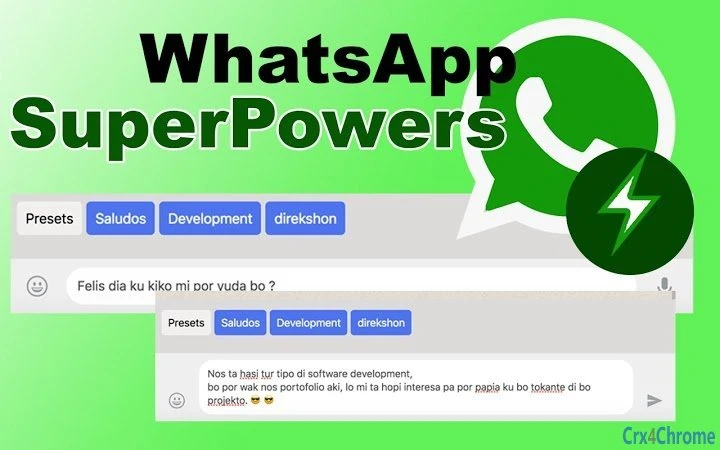
- Preset Message Templates – Users can create and store frequently used messages for quick access, reducing the need for manual typing during high-volume communication.
- Automated Reminders – Set time-based alerts that trigger message delivery at specified intervals, helping users stay on top of follow-ups and deadlines.
- Overlay Integration with WhatsApp Web – The tool runs as a browser extension that integrates seamlessly with the WhatsApp Web interface, preserving the original user experience.
- Task Automation for Repetitive Actions – Streamlines routine messaging tasks, such as sending daily check-ins or periodic updates, minimizing manual input.
- Secure Browser-Based Operation – All automation occurs within the browser environment, reducing the risk of data exposure compared to standalone applications.
These features are particularly useful in scenarios such as customer service workflows, team coordination, or personal productivity management. For example, a small business owner could use preset messages to respond to common client questions instantly, while a project manager might schedule reminder messages to team members at specific times. The automation layer operates without requiring changes to the WhatsApp Web interface, ensuring compatibility and ease of use.
User Interface, Workflow & Performance
The user interface is built to integrate smoothly with the WhatsApp Web environment, presenting controls and settings through a compact overlay panel. Navigation is straightforward, with options accessible via a small icon within the WhatsApp Web window. Users can configure templates, set reminders, and manage automation rules through a clean, minimalistic layout.
Workflow efficiency is enhanced by the tool’s ability to execute tasks with minimal user interaction. Once templates and reminders are set up, users can trigger actions with a single click or automatically based on scheduled times. The tool operates within the browser’s runtime environment, meaning performance is dependent on the host system’s browser and hardware capabilities.
The developer did not specify resource usage details. Performance observations are based on general software behavior patterns. Stability is expected to be consistent with standard browser extensions, though real-world behavior may vary depending on the user’s device and browser configuration. No reports of crashes or memory leaks were provided.
Compatibility & System Requirements
The software is compatible with Windows, Mac, and Linux operating systems. It functions as a browser extension, meaning it relies on the user’s installed web browser for execution. The installation size is 2.1 MB, indicating a lightweight footprint.
Exact system requirements were not listed. Compatibility information is limited to the operating systems mentioned. No specific browser requirements were provided, though typical browser extensions require modern versions of Chrome, Firefox, or Edge. The software does not require administrative privileges for installation, suggesting it is designed for easy deployment across different user environments.
Pros and Cons
Pros
- Lightweight design with a small installation size of 2.1 MB
- Seamless integration with WhatsApp Web without modifying the original interface
- Automates repetitive messaging tasks, saving time and reducing errors
- Free to use with no cost barrier to entry
- Available on multiple platforms: Windows, Mac, and Linux
Cons
- Does not function independently of WhatsApp Web; requires an active browser session
- Automation features are limited to messaging and reminders, with no advanced workflow options
- Resource usage details were not provided, making performance prediction difficult
- Third-party status means no official support from WhatsApp
- No offline mode available; requires internet connection and browser access
FAQ Section
Is this tool compatible with all browsers?
The software is designed to work with modern web browsers, but specific browser compatibility was not detailed in the provided information.
Is the tool safe to use with WhatsApp?
The tool operates as a browser extension and does not access WhatsApp data directly. It functions as an overlay, relying on the existing WhatsApp Web session. No data collection or transmission claims were provided.
Does it require a paid subscription?
No, the software is available for free. There are no reported subscription models or in-app purchases.
Can I use it without an internet connection?
No, the tool requires an active internet connection because it runs on WhatsApp Web, which depends on real-time server communication.
How often are updates released?
Update frequency was not specified. Users should check the extension’s official source for the latest version.
Final Thoughts + CTA
This productivity-enhancing tool offers a practical solution for users who want to streamline their WhatsApp communication without leaving the familiar WhatsApp Web environment. By introducing automation for repetitive messages and reminders, it delivers tangible time savings and improved workflow consistency. Its lightweight design, cross-platform availability, and zero cost make it accessible to a wide audience.
While it has limitations—such as dependency on a browser session and lack of advanced automation features—it fulfills its core purpose effectively. The absence of official WhatsApp affiliation ensures transparency, and the browser-based operation maintains a secure user experience.
For professionals, small business owners, and individuals managing high-volume messaging, this tool represents a smart, no-cost upgrade to WhatsApp Web. Download WhatsApp Automation Tool now and unlock greater efficiency in your daily communication.







